

Bottom Up
for an old-fashioned typewriter effect (can be used for subtitles)
Bottom Up can be used as single line but it is designed to be used as a multiline text display.
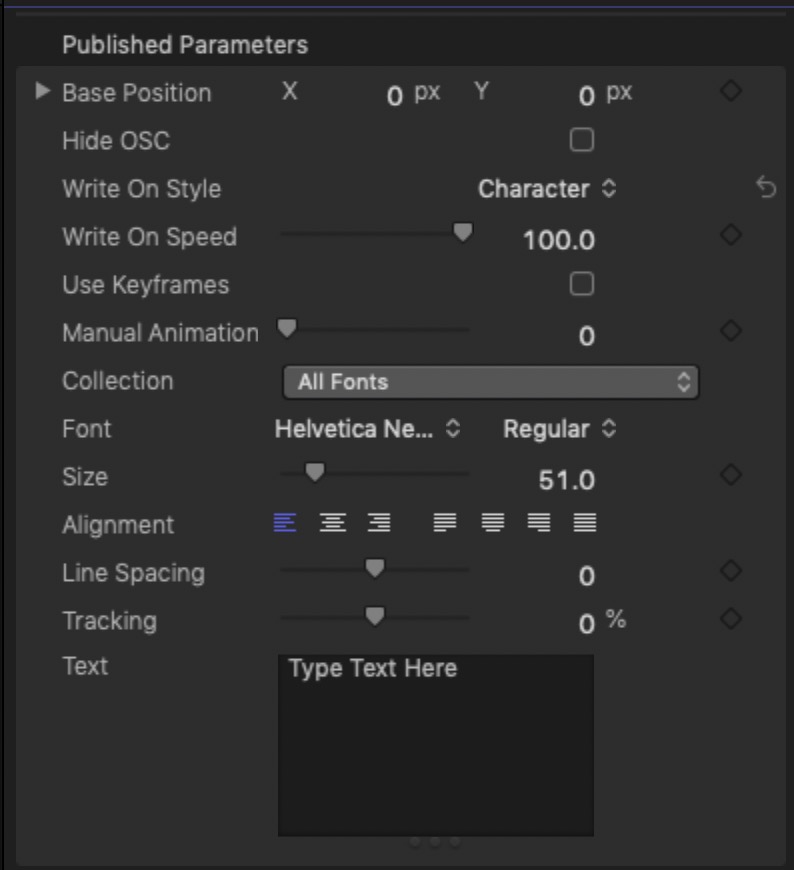
There is an OnScreen Control for easy positioning with an option to hide the control.
The Write On styles are by Character (with or without spaces), Word or Line.
The automatic Write On Speed defaults to 100 (which is in Percent). This makes preparing the text in the Viewer easier since all of the text will be present regardless of playhead position.
Note: when Write On Speed is at 100, the text will be “always on” regardless of playhead position! Be sure to set it below 100 (significantly) to actually have an animation to write on.
Manual animation is for keyframing the write on speed to your needs. It is also quite useful for multiple paragraph texts to create pauses at the “carriage return” stops (see video below).
Switching between automatic and manual animation is allowed for editing.
This plugin is 100% made in Motion. No FxPlug code is used. This title should not break when Apple updates it’s software or hardware!
Tips
Pauses in automatic animation can be created by adding multiple consecutive spaces, at the end of sentences before a carriage return (may be dependent on alignment setting) and immediately after a carriage return for a blank line.
Select text in the Viewer and not the inspector to apply in-text style changes.
Demo:
Keep up to date with Sight-Creations on Twitter.
A good place to see all of my effects as well as several tutorials and other demonstrations in use is on my YouTube channel.